 Seeking LED
LED Flood Light Wiring Diagram: A Practical Guide from Real Installations
184LED flood light wiring diagram explained by real installers. Learn correct connections, grounding, safety codes, and mistakes to avoid with SEEKINGLED.
View detailsSearch the whole station
This is a question that usually shows up after installation, not before.
The lights are mounted, power is on—and something feels off.
They flicker.
They stay dimly lit when switched off.
Or worse, they shut down randomly.
If you’re searching how to stop LED high bay lights, you’re likely dealing with one of these issues.
Flickering almost always points to a power or control issue, not the LED chips themselves.
Common causes include:
In field projects handled by SEEKINGLED, driver mismatch is the most frequent reason. The fixture works, but the driver struggles under real load conditions.
This is often called ghosting.
It usually happens when:
Adding a proper load, correcting wiring, or using a driver designed for industrial controls typically solves the issue.
Yes, and it’s more common than people expect.
High bay fixtures sit high, where heat collects. If airflow is poor or ambient temperature is underestimated, thermal protection may trigger shutdowns.
This isn’t a defect—it’s the system protecting itself.
Not always.
Sometimes stopping LED high bay light problems only requires:
That’s why SEEKINGLED often checks electrical conditions before recommending a full fixture replacement.
When people ask how to stop LED high bay lights, they’re really asking how to make the system behave normally again.
In most cases, the fix is electrical—not optical.
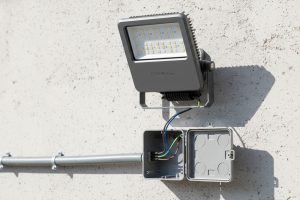
LED flood light wiring diagram explained by real installers. Learn correct connections, grounding, safety codes, and mistakes to avoid with SEEKINGLED.
View details
What wattage for outdoor LED flood lights is actually needed? A practical guide based on outdoor use, not lab numbers.
View details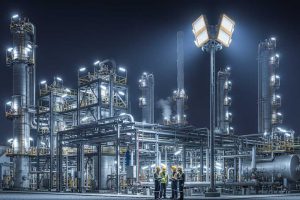
ATEX LED flood light built for hazardous areas in oil, gas, and chemical plants. Reliable explosion-proof lighting with high efficiency and durability from SEEKINGLED.
View details
Are flickering LED lights dangerous in real environments? Learn causes, health risks, and how SEEKINGLED lighting systems reduce flicker for safer performance.
View details